
How to Keep Your Phone Safe from Pickpockets in Crowded Areas
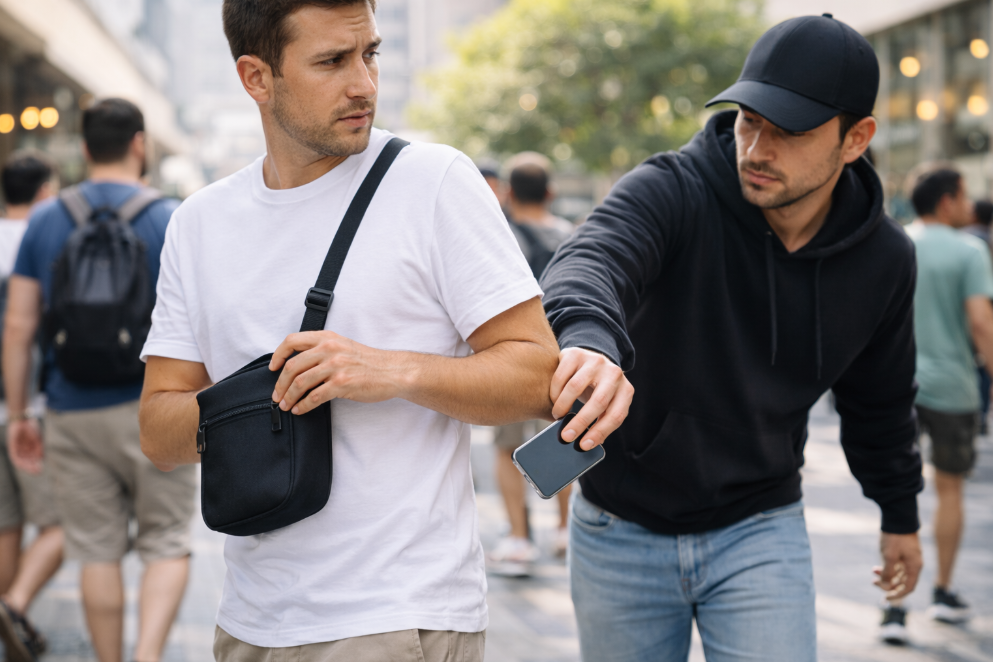
How to keep your phone safe from pickpockets is a question every resident and visitor in the UAE should take seriously.
With millions of people moving through Dubai’s metro stations, Abu Dhabi’s malls, and bustling tourist districts every day, smartphones have become the number one target for thieves.
Your phone is not just a device; it holds your banking apps, personal data, and digital wallet. Losing it means losing far more than the hardware.
Why Phone Theft Happens More Than You Think in the UAE
The UAE attracts tens of millions of tourists and hosts one of the most active urban populations in the world.
Crowded spaces like Dubai Mall, the Dubai Metro, Deira markets, and Abu Dhabi Corniche create ideal conditions for pickpockets. Thieves do not only want your device.
They want access to your bank accounts, saved passwords, and payment apps. A stolen unlocked phone can result in financial losses that far exceed the value of the phone itself.
You can use the iPhone Crossbody Bag to carry your phone securely in crowded places and keep it out of reach from pickpockets.
Physical Habits That Protect Your Phone Every Day
Keep your phone hidden, carry it securely, and stay aware of your surroundings especially in crowded UAE environments.
1. Where are the highest-risk areas in the UAE?
The Dubai Metro, busy souks in Deira, and crowded tourist spots are where most incidents happen. Do not walk through these areas while staring at your screen. Stay aware of your surroundings at all times.
2. How should you carry your phone in public?
- Never place your phone in your back pocket
- Use a front pocket or a zipped inner compartment in your bag
- Choose a backpack with anti-theft zippers that cannot be opened quietly from behind
- Avoid outer bag pockets with no lock or zip
3. What should you do when using your phone on the street?
Avoid using your phone near the edge of roads or open areas where motorbike theft is possible. If you need to take a call or check a map, step to the side and place your back against a wall.
4. What are the rules for restaurants and cafes in the UAE?
- Never leave your phone on the table while eating
- Keep it in your pocket or bag at all times
- Be especially careful in tourist-heavy areas like Downtown Dubai or the Abu Dhabi Corniche, where distractions make theft easier
Lock Your Device the Right Way
Biometrics, a strong PIN, a locked SIM, and hidden notifications block most theft attempts before they cause damage.
Device security is the second layer of protection in how to keep your phone safe from pickpockets.
Should you use biometrics or a PIN? Use both. Enable face recognition or fingerprint on your phone and banking apps. Even if a thief sees your PIN, biometrics stop them from going further.
1. What makes a strong PIN?
Avoid birthdays or simple sequences. Use a six-digit PIN or an alphanumeric password.
2. Why lock your SIM separately?
A SIM PIN stops thieves from using your number on another device to receive verification codes.
3. Why disable notification previews?
One-time codes appear on your locked screen. A thief does not need to unlock your phone to read them.
Enable Remote Tracking and Protection
Set up tracking before anything happens it is useless after the fact.
4. How do you track your phone if stolen?
- iPhone: Activate Find My via Apple ID settings
- Android: Enable Find My Device
- Samsung: Enable SmartThings Find
5. What is your IMEI and why does it matter in the UAE?
Dial asterisk hash zero six hash to find it. Save it separately. UAE police and telecom authorities use it to block stolen devices.
Protect Your Banking Apps and Digital Wallet
Lock every banking app individually, reduce stored cards, and use an authenticator app for 2FA.
1. Do UAE banks support biometric login?
Yes. Emirates NBD, ADCB, and FAB all support fingerprint and Face ID inside their apps. Never rely on your phone’s main lock screen alone.
2. How many cards should you store in your digital wallet?
As few as possible. Enable transaction alerts to catch suspicious activity immediately.
3. Is SMS two-factor authentication safe enough?
No. Use an authenticator app. It requires biometric confirmation, making remote access nearly impossible.
Stay Safe in the UAE: Your Phone Security Starts Today
Learning how to keep your phone safe from pickpockets in the UAE means combining physical awareness with smart digital protection. The UAE ranks among the safest countries in the world, but no environment is completely risk-free.
Take five minutes today to:
- Enable remote tracking on your device
- Lock your SIM card with a separate PIN
- Add biometric protection to your banking apps
Prevention is always faster and cheaper than recovery.
FAQs About How to Keep Your Phone Safe from Pickpockets
What is the safest way to carry my phone in the UAE?
How should I carry my phone to avoid theft in public?
Keep your phone in a front zipped pocket or an anti-theft bag. Never leave it visible in a back pocket or on a table.
How do I track my phone if it is stolen in the UAE?
Can I find my phone after it is stolen in Dubai?
Use Find My on iPhone or Find My Device on Android. Activate these before any incident occurs.
What should I do first if my phone is stolen in Dubai?
What are the immediate steps after phone theft in the UAE?
Lock your device remotely, call your bank, and report to UAE police with your IMEI number.
Does UAE police help recover stolen phones?
Will Dubai police find my stolen phone?
Yes. Filing a report with your IMEI increases the chance of recovery and is required for insurance claims.
How do I lock my SIM card in the UAE?
Can I protect my SIM from being used if my phone is stolen?
Go to your phone settings under security and enable SIM card lock with a separate PIN.
What is an IMEI number and why does it matter in the UAE?
How does the IMEI help if my phone is stolen?
It is a unique 15-digit identifier. Police and telecom providers in the UAE use it to block and trace stolen devices.
Should I use biometrics instead of PIN on banking apps in the UAE?
Is fingerprint login safer than PIN for banking apps?
Yes. Biometric login prevents access even if someone knows your screen PIN.
How do I hide my banking apps from thieves?
Can I create a hidden folder for sensitive apps on my phone?
Yes. Both iPhone and Samsung devices support secure or hidden folders protected by biometrics.
What areas in the UAE have the highest risk of phone theft?
Where in Dubai or Abu Dhabi should I be most careful with my phone?
Crowded metro stations, tourist markets in Deira, busy malls, and outdoor tourist attractions carry the highest risk.
Is phone theft covered by insurance in the UAE?
Does UAE travel or home insurance cover stolen phones?
Some home and travel insurance policies cover theft. Check your policy details and always file a police report first.